our blog
Quick memoQ Reference on Creating Different Types of Files
17 November 2016
This is a quick reference for creating different types of files in memoQ. The file is supposed to already be translated
All commands mentioned below are accessible from the dialog window that appears after right-clicking a file on the Project home tab in memoQ interface.
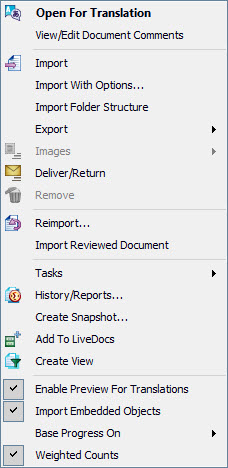
- How to create .mqxlz file:
- Right-click the memoQ file > Export > Export Bilingual > memoQ XLIFF - How to convert memoQ file into Trados-compatible format (as if it was translated in Word with Trados 2007):
- Right-click the memoQ file > Export > Export Bilingual > Trados-compatible bilingual DOC - How to create .mqback file in memoQ:
- Right-click the memoQ file > Deliver/Return - How to create clean file in memoQ:
- Right-click the memoQ file > Export > Export (Dialog)
Recommended content
Useful Keyboard Shortcuts for Browsers
Handy keyboard shortcuts One sign of a proficient computer user is that they regularly use keyboard shortcuts. If something can be done with either the keyboard or the mouse, they will usually choose the keyboard. Most people primarily use a mouse when browsing the web. However, many browser actions can be performed just as easily—and, […]

How to Fix the “Error processing command line arguments” Issue in Trados Studio
About another Trados Studio issue Another Trados Studio quick fix: If you see this error dialog, it’s resolved the same way as the Access to the path … is denied error.

How to use the ampersand and how is it different from and
A little bit on how & is different from and The ampersand is a ligature that the Latin conjunction et, which means and, has been transformed into. Once upon a time, the ampersand was even considered the 27th letter of the alphabet. When pronouncing letters in the alphabet, it was ended with the words and […]

How to split a large Trados Studio file into multiple parts
About splitting a large file into multiple parts How to split a large Trados Studio file into several parts: ➕ The plugin is free, simple, and effective. Trados Studio is not needed at all. ➖ It is better to use it only for splits, there are problems with merges. * * * ➕ Always works […]

T9N, L10N, I18N, G11N, C13N, M17N, V8N
Some slang abbreviations from the localization field Let’s check some slang abbreviations from the localization field. All of them are based on the principle of “taking the first and last letters of a word, cutting out the middle, and writing the number of the cut out letters instead.” These terms are vague, and their meanings […]
