How to Fix the “Argument ‘0’ is out of range” Error in Trados Studio

When working in Trados Studio, translators may sometimes encounter a confusing message:
Argument '0' is out of range. It should be between 1 and 2147483647. Parameter name: <...>
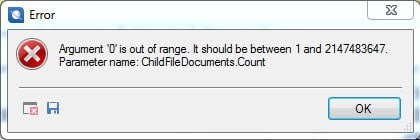
At first glance, this looks like pure technical jargon—just “something wrong with numbers.” However, in practice, this Trados Studio error can block saving and make it seem like your translation work has been lost.
In this guide, we’ll explain what the error means, why it appears, and how to fix the “Argument 0 is out of range”problem in Trados safely—without losing your project data.
Common causes of the error
The Trados Studio error “Argument '0' is out of range” occurs when the software incorrectly accesses certain project files. To put it simple, Trados is trying to read or modify data that doesn’t exist or lies outside an acceptable range (from 1 to 2147483647).
Here are the most common causes:
1. Multiple files from the same package are open simultaneously.
If several documents from one localization package are open at once, Trados Studio may get confused about the internal file structure—especially when the Include subfolders option is enabled.
2. Corrupted internal structure of temporary data.
Trados creates temporary project files for each open document. If one of these temporary files becomes damaged, the program may incorrectly reference it, causing the “Argument '0' is out of range” error in Trados Studio.
3. Autosave or synchronization failure.
When Trados fails to save data to the translation memory or cache in time, the system throws this same error message—“Argument '0' is out of range.”
Regardless of the cause, the danger is that Trados temporarily blocks the file saving feature. It may appear as though the translation is gone—but in reality, your confirmed segments are still stored in the translation memory and can be recovered.
Steps to fix the error
So, what should you do if you see the “Argument '0' is out of range” error in Trados Studio when pressing Ctrl + S or trying to export your project? Follow these steps carefully.
1. Don’t panic—and don’t re-import the package
The worst thing you can do is delete the project and re-import the package. Doing so creates a new set of files that are no longer linked to your existing translation memory—effectively causing data loss.
2. Close all open files without saving
If Trados refuses to save, simply close all open documents without making any manual changes. Your confirmed segments are already stored in the memory and won’t be lost.
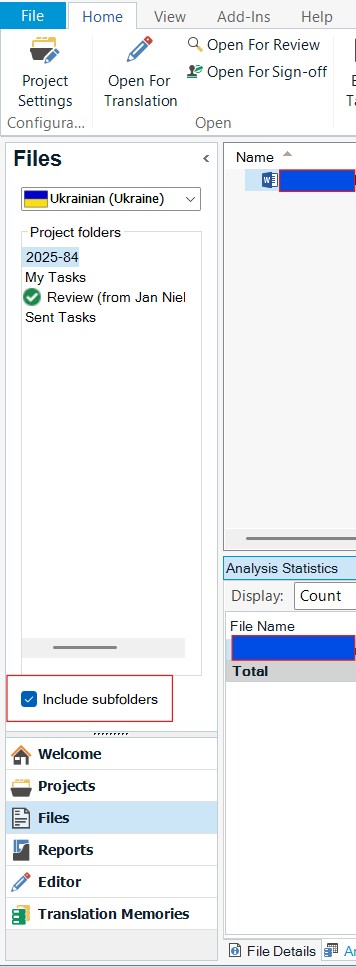
3. Disable the “Include subfolders” option
When reopening your project, go to the Files pane and uncheck the Include subfolders box. This helps Trados correctly identify the current file and prevents internal conflicts that can lead to the “Argument '0' is out of range” error.
4. Open files one by one
Next, open only one document at a time. Trados Studio works much more reliably when handling files sequentially rather than simultaneously.
5. Restore translations from Translation Memory
For each document, press Ctrl + T to reinsert all confirmed segments from Translation Memory (TM). This will restore your text exactly as it was before the crash. Note that this will work if only you have previously confirmed segments with Ctrl + Enter.
6. Save the document as usual
Finally, save the file again with Ctrl + S or via File → Save.
The “Argument '0' is out of range” error in Trados Studio should now be resolved, allowing you to continue working safely.
Prevention and tips
To avoid encountering this Trados Studio error again, consider these best practices:
- Avoid opening multiple files simultaneously.
Trados Studio does not always work stably with multiple tabs, especially if the project structure is complex.
- Keep Trados Studio updated.
The “Argument '0' is out of range” error primarily occurs in older versions of Trados Studio 2019–2021. Installing the latest updates helps eliminate such technical issues.
- Back up your projects regularly.
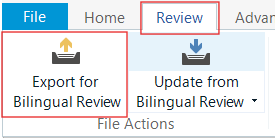
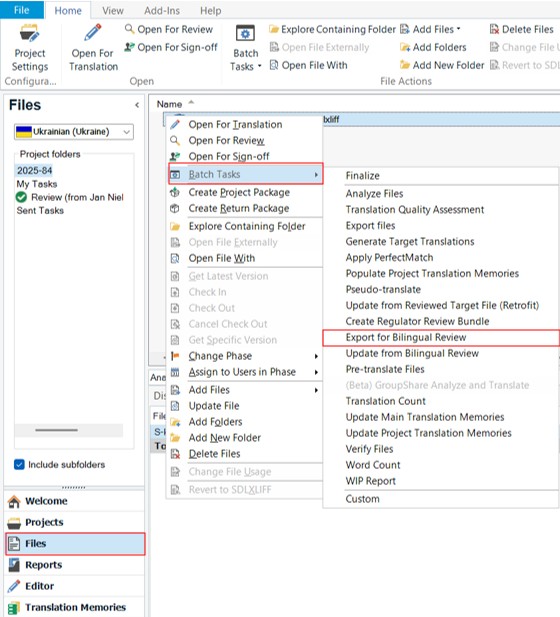
Use the Export for Bilingual Review option or copy your entire project folder manually. There are two ways to export:
- When a document is open, click Export for Bilingual Review on the Review tab:
- In the project’s Files view, right-click the file → Batch Tasks → Export for Bilingual Review:
- Confirm segments regularly.
Press Ctrl + Enter after each segment. This saves your translation to memory automatically, ensuring that even if an error occurs, your confirmed text is preserved, and the data will not be lost.
- Use an external translation memory.
Creating a separate TM outside your Trados package lets you store translations independently of any specific project, providing extra security and flexibility.
This allows you to save translations independently of a specific project or client package.
Other notes
The “Argument '0' is out of range” error in Trados Studio may look intimidating, but it’s not a fatal problem. The key is to stay calm—don’t delete or re-import your project. Your translation is still there; it’s just “locked” due to how Trados handles opened files and project structure.
By following the recovery steps above—closing open files, disabling the Include subfolders option, and reopening one document at a time—you can restore your work and continue without losing any progress.
So, the next time Trados Studio displays the “Argument '0' is out of range” error, you’ll know exactly how to fix and prevent it in future projects.
We have previously discussed the algorithm for fixing common Trados Studio errors, as well as some unusual problems, such as the “Dependency file not found” message.
Recommended content

How to Fix the “LNG Is Missing” Error in MultiTerm
How to Fix the “The Specified Project Name Is Invalid” Error in Trados Studio
Useful Keyboard Shortcuts for Browsers

How to Fix the “Error processing command line arguments” Issue in Trados Studio


