our blog

How to Translate TXLF Wordfast Files in Trados Studio

How to Translate TXLF Wordfast Files in Trados Studio - 1

Trados Studio can be used to translate .txlf Wordfast files

If you do not have or do not like or do not work in Wordfast, you can translate its files in Trados Studio.

Trados Studio knows well how to process different file types (WordExcel, HTML and many, many others). To teach your Trados Studio to work with TXLF Wordfast files means to explain it what those files actually are.

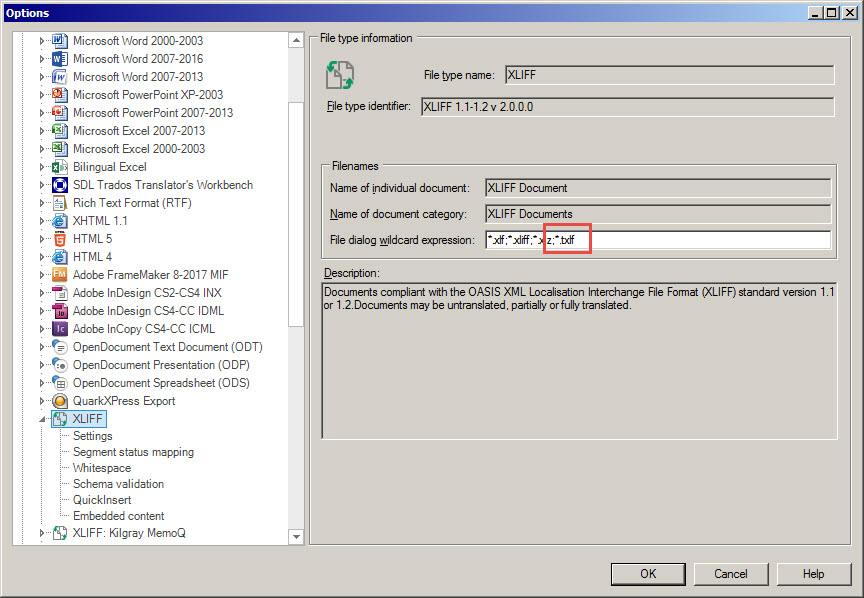
A TXLF file is actually a standard XLIFF file with changed extension. So it is enough to add a file mask to the other existing XLIFF files in Trados Studio settings.

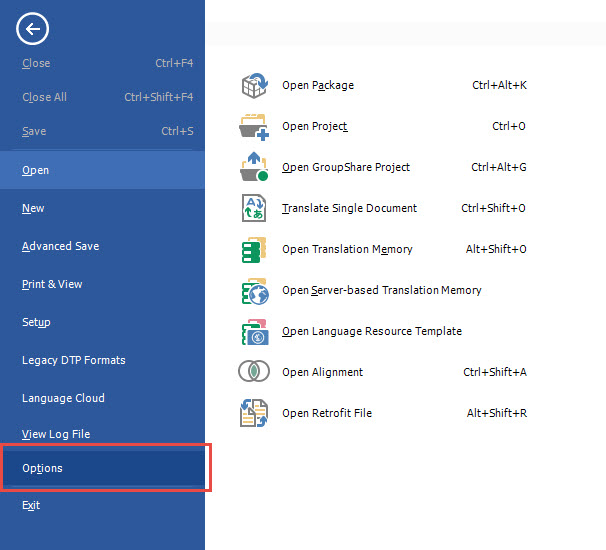
To do this, select File > Options:
How to Translate TXLF Wordfast Files in Trados Studio - 2

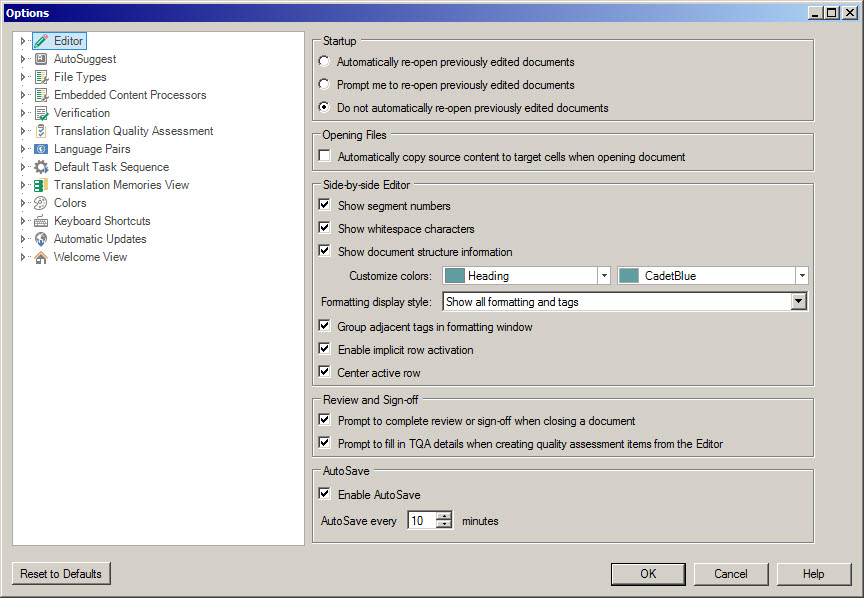
Options dialog window opens:

How to Translate TXLF Wordfast Files in Trados Studio - 3

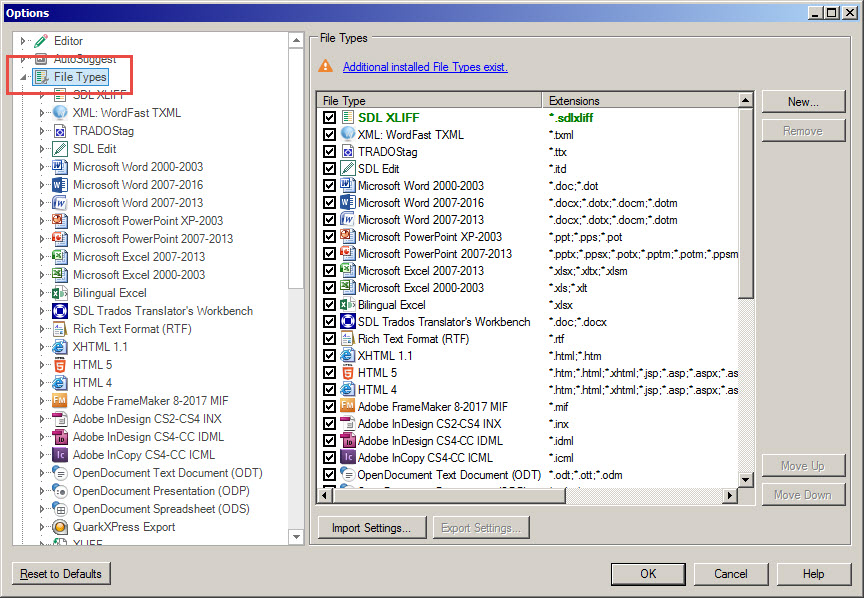
Select File Types:

How to Translate TXLF Wordfast Files in Trados Studio - 4

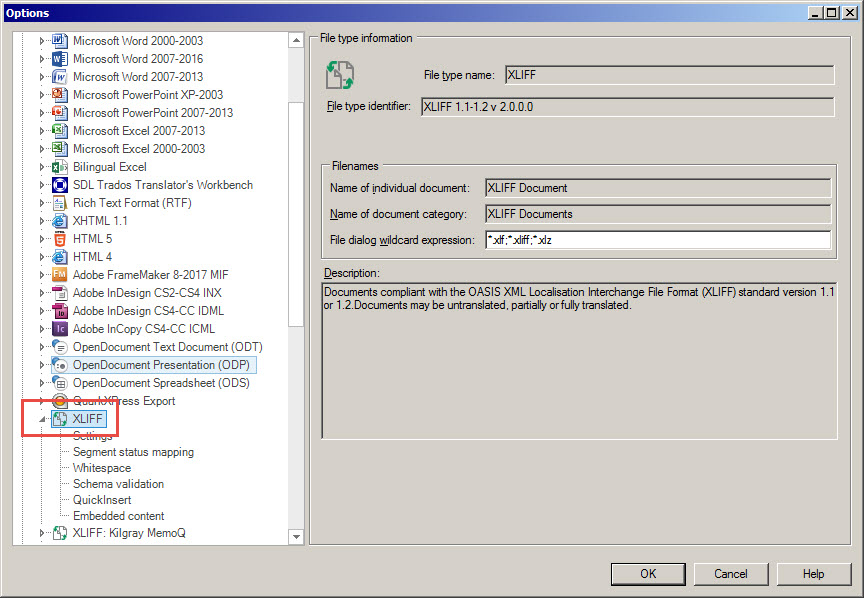
Scroll to the XLIFF item and click it:
How to Translate TXLF Wordfast Files in Trados Studio - 5

On the right pane, all possible XLIFF files extensions are listed. What you need to do is to add a mask for TXLF—;*.txlf:
How to Translate TXLF Wordfast Files in Trados Studio - 6

Then, click OK. That's it: now your Trados Studio is able to work with TXLF Wordfast files.

To receive the translated TXLF files after translation, just perform a regular clean procedure.

Recommended content

How to Translate TXLF Wordfast Files in Trados Studio - 7

How to fix «Failed to open return package» error in Trados Studio

About another issue in Trados Studio When importing a package, Trados Studio might say that it Failed to open return package, because it contains a project that does not exist in your setup. That it’s not a Trados Studio issue, but yours: you tried to import a return package for a project Trados Studio doesn’t […]
How to Translate TXLF Wordfast Files in Trados Studio - 8

Lorem ipsum

About the dummy or placeholder text Lorem ipsum is a meaningless Latin text, so-called dummy or placeholder text, which is used to estimate how a layout will look with text presented in a particular font. This is usually done by designers, but it is also needed for pseudo-localization. This text became widely popular due to […]
How to Translate TXLF Wordfast Files in Trados Studio - 9

You sell not only the translation, but also your expertise

Some thoughts and reflections Modern technical translators have to be inquisitive. They don’t even have to; they must. The tools they use today will become unrecognizable in a few years. New programs and methods emerge, existing knowledge becomes outdated, and translators who are not interested in anything beyond the text are being outpaced by more […]
How to Translate TXLF Wordfast Files in Trados Studio - 10

Two stories about ChatGPT

Interesting facts about AI In early April 2024, artificial intelligence expert Jeremy Nguyen shared a thing he noticed: for some reason, the unremarkable word delve was used unexpectedly often in the texts generated by ChatGPT. So much often that Paul Graham, co-founder of Y Combinator and noted IT evangelist, considers the presence of this word […]
How to Translate TXLF Wordfast Files in Trados Studio - 11

File Formats That Compress Well in ZIP Archives

Useful information about file formats As we already know, there is little point in archiving certain file formats because they do not compress well. On the other hand, some formats compress very efficiently: Files that store plain text, including TXT and CSV. Older Microsoft Office formats whose extensions do not end in X: Subtitle files, such […]