our blog

How to Convert Wordfast TM into TMX

How to Convert Wordfast TM into TMX - 1

The most convenient way to convert Wordfast TM to TMX format involves Xbench

Wordfast TM file has .txt extension. It is a usual .txt file delimited with tabs specially. There are several ways to convert it to TMX format that allows TM exchange between other CAT tools. The easiest and quickest way involves Xbench (either free or paid version).

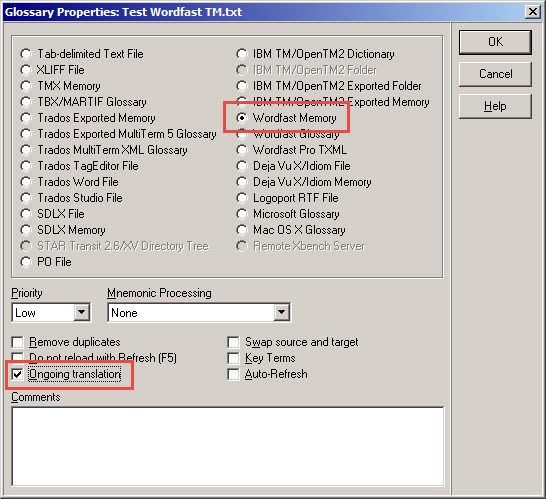
Step 1: Load your Wordfast TM into Xbench. There is a special file type Wordfast Memory:
How to Convert Wordfast TM into TMX - 2

Do not forget to set the checkbox Ongoing translation.

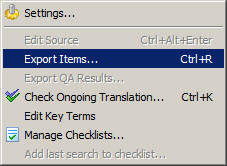
Step 2: In Xbench, select Tools > Export Items, or simply press Ctrl + R.
How to Convert Wordfast TM into TMX - 3

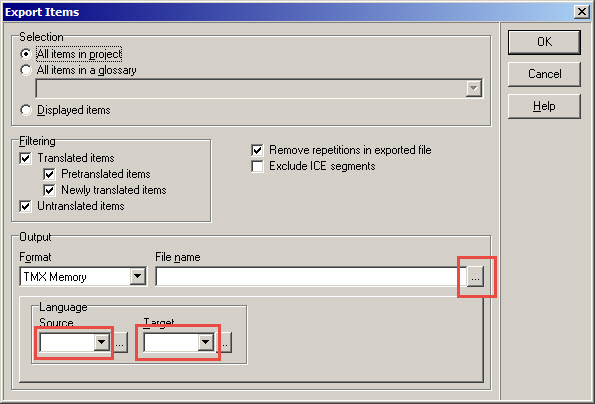
Export Items dialog box appears. Specify the settings in the Output section: select source and target languages, and the path and the file name for the .tmx file of the TM.
How to Convert Wordfast TM into TMX - 4

Press the OK button. The .tmx file you get is the converted Wordfast TM.

Recommended content

How to Convert Wordfast TM into TMX - 5

Artificial Intelligence is not Intelligence

A few thoughts on artificial intelligence For an AI chatbot like ChatGPT to work, it first needs to train the Large Language Model (LLM) it relies on using a huge amount of text data. Modern LLMs are trained on almost everything that can be found on the internet. The texts generated by chatbots are often […]
How to Convert Wordfast TM into TMX - 6

Where will experienced translators come from if there are fewer inexperienced ones on the market?

Abstract semi-philosophical considerations Machine translation is gradually pushing out of the market those translators who cannot keep up with it in terms of quality, i.e., those who are not very experienced. As a result, the ratio of experienced to inexperienced translators should theoretically gradually change in favor of the former. This seems to be a […]
How to Convert Wordfast TM into TMX - 7

How to fix «Failed to save target content: Cannot find central directory» error in Trados Studio

About the ways to fix the issue in Trados Studio When trying to generate a translated document in Trados Studio, this error sometimes occurs: Failed to save target content: Cannot find central directory. It happens because of corrupted data in the source file used to create and store the SDLXLIFF file you translated in Trados […]
How to Convert Wordfast TM into TMX - 8

How to fix «Failed to open return package» error in Trados Studio

About another issue in Trados Studio When importing a package, Trados Studio might say that it Failed to open return package, because it contains a project that does not exist in your setup. That it’s not a Trados Studio issue, but yours: you tried to import a return package for a project Trados Studio doesn’t […]
How to Convert Wordfast TM into TMX - 9

Lorem ipsum

About the dummy or placeholder text Lorem ipsum is a meaningless Latin text, so-called dummy or placeholder text, which is used to estimate how a layout will look with text presented in a particular font. This is usually done by designers, but it is also needed for pseudo-localization. This text became widely popular due to […]