Why UI/UX Localization Matters: Examples of Good and Bad UX Copy
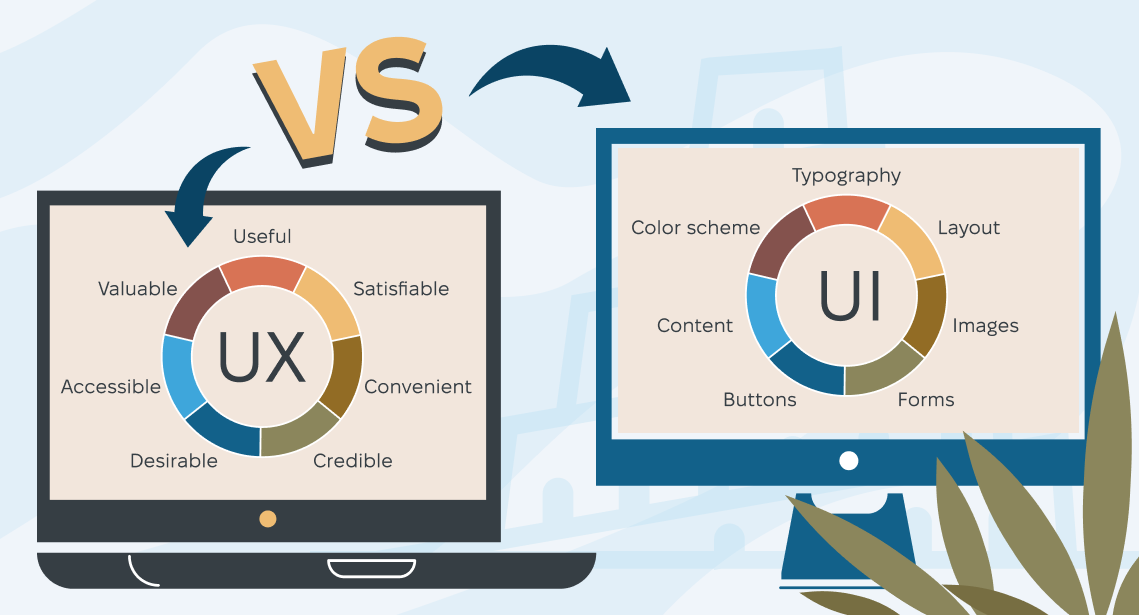
When companies talk about localization, they often think about “just translating the interface.” But in practice, UI localization and UX localization are not the same thing—and confusing them can cost you conversions, trust, and user satisfaction.
Great products don’t just speak the user’s language. They think in the user’s cultural and contextual framework. That’s where UX copywriting and UX content writing come into play.
In this article, we’ll explore the difference between UX copy and direct ukrainian translation, look at real-world examples of both good and bad UX writing, break down the most common UI/UX localization mistakes, and share practical ways to improve your UX copy for global markets. We’ll also review case studies from companies like Airbnb and Western Union to show the real business impact of thoughtful UX localization. Let’s find out how localization UX influences not just linguistic quality, but conversions, trust, and overall product performance.
UX copy vs. direct translation
Before diving into examples, let’s clarify an essential concept.
UX copywriting is not the same as interface translation. Direct translation focuses on linguistic equivalence while UX writing focuses on user intent, clarity, and behavior.
Translation asks: “Is this accurate?” while UX writing asks: “Will the user understand what to do next?”
What is UX content
If you’re wondering what UX content is, the short answer is: It’s every piece of text that helps the user interact with a product:
- Buttons and CTAs
- Error messages
- Tooltips and hints
- Onboarding instructions
- Empty states
- Settings descriptions
In other words, copy UX is part of the interface logic, not decoration.
Why direct translation often fails
Here’s a simple example:
English button:
“Get started”
Direct translation into another language might mean:
“Begin” or “Start”
But in many markets, a more natural UX pattern would be:
- “Create account”
- “Try for free”
- “Continue”
This is a UX localization decision, not a linguistic one.
UI localization vs. UX localization
| UI localization | UX localization |
| Translating strings | Adapting intent and behavior |
| Focused on text | Focused on user experience |
| Often literal | Often rephrased |
| Low context | High context |
| Cheaper | Higher ROI |
Localization UI concerns language, while localization UX concerns usability.
Examples of good UX localization
Let’s look at what good user interface localization looks like in practice—including an illustrative case study from a major global brand.
1. Airbnb: beyond language to local experience
Airbnb is available in dozens of languages, but its UI/UX localization goes far beyond translation. They adapt not only text but payment methods, currency display, form layouts, and even login options to suit local expectations—for example, supporting WeChat and Weibo logins in China and adjusting currency formats for each country.
This is localization done with the user’s context in mind—not just words. Airbnb’s approach shows how deep localization UX can be:
- Increase trust by showing local currencies and payment options
- Reduce friction by offering regionally familiar login flows
- Manage content length and pacing so localized text doesn’t break layouts
Airbnb’s strategy demonstrates how UI localization best practices enhance user comfort and drive conversions worldwide.
2. Western Union: UX localization and copy rewrites increase conversions
A real UX writing case study comes from Western Union’s global money transfer experience. UX researchers observed that customers often dropped out mid-transaction because they didn’t understand what to do or why certain personal information was needed.
By rewriting the send-money journey with localized, conversational, and instructive copy—especially around error messages, tooltips, and form guidance—the team achieved:
- 32% decrease in “on hold” transaction rates
- 16% decrease in declined transactions
- 23% increase in conversion rate
- Improved customer satisfaction and retention
This case shows how UX content writing tailored for global audiences can directly impact conversion—far beyond literal translations.
3. UX content in onboarding flows
In SaaS products, onboarding screens are among the most frequently seen UX copy elements. When localized correctly for tone, wording, and cultural patterns (e.g., ordering of steps), users complete onboarding faster and with fewer mistakes.
For example, adapting onboarding microcopy to explain the “why” behind data entry rather than merely stating requirements leads to higher completion rates. This is localization UX best practices in action.
Examples of bad UX localization (and why it fails)
While good localization enhances trust and conversions, poor localization—especially bad UX writing examples—can do the opposite.
1. The “Submit” button gone wrong
When translated literally into some languages, “Submit” can sound bureaucratic or convey an unintended tone. Users may hesitate, thinking they are committing to a final legal action. This is a classic example of bad UX writing because it ignores user context.
Better localized CTAs, such as “Confirm Purchase” or “Save and Continue,” perform much better.
2. Literal system errors
For instance:
- Bad translation: “Input data is invalid.”
- Better UX localized error: “Please enter a valid email address.”
The latter helps the user understand exactly what is wrong and how to fix it.
3. Broken layouts from literal copy
Translated strings that are too long can:
- Overflow buttons
- Push layouts off-grid
- Create clipped text
This kind of issue happens when teams treat localization as string swapping rather than thoughtful user interface localization.
4. Culturally inappropriate metaphors
Idioms like “kill the task” or “shoot us a message” may be commonplace in one language but can be confusing, offensive, or nonsensical in another, particularly when translated literally.
Common UI/UX localization mistakes
To avoid falling into the trap of bad translations and bad UX writing examples, be aware of these systemic pitfalls:
1. Treating UX copy as “just text”
Exporting strings → translating—and re-importing is not UX localization. It’s just localization UI without UX thinking.
2. No context for translators
Without screenshots or user flows, translators cannot make informed choices about tone or intent.
3. Ignoring cultural conventions
Different markets have different expectations for tone, date formats, numbers, interaction pace, and even color symbolism.
4. One-size-fits-all tone
A “friendly, informal” tone may be great in one culture and off-putting or inappropriate in another.
5. Skipping post-localization UX testing
Most teams test functionality but don’t test UX copy in context, leading to preventable issues slipping into production.
How to improve UX copy for local markets
Now that we’ve seen what works (and what doesn’t), let’s talk about how product teams can elevate their localization UX.
1. Start with UX writing, not translation
If the base English UX copy is unclear, no amount of localization will fix it. Good UI copywriting starts with good source text.
2. Build a UX content style guide per market
The guide should cover:
- Tone
- CTA patterns
- Error message templates
- UX vocabulary preferences
This is key for UX content writing that scales.
3. Involve local reviewers
Ideal reviewers are:
- Native speakers
- UX practitioners
- Familiar with your industry
4. Test like a feature
Treat localized UX copy changes like code:
- A/B test CTA variants
- Measure clickthrough and conversion lifts
- Track user flows by language
5. Integrate localization tools with UX workflows
Platforms that integrate translation memory (TM), in-context editing, and version control help teams efficiently apply localization UI best practices.
Final thoughts
Consider localization UX as a competitive advantage. Think of localization UX not as a cost but as a growth lever.
User experience and UX copywriting tailored to local markets increases:
- Conversions
- User satisfaction
- Trust and retention
Great localization UX makes your product feel like it was built for that market, not translated into it.
Recommended content

How to Run a Tender for Ukrainian Translation Services

How to Localize E-commerce Product Descriptions to Boost Global Conversion Rates

Translation vs. Transcription: What Is the Difference?

What Is Transliteration? How It Differs From Translation and Transcription