our blog

Attribute Error in WordFast 5.6

Attribute Error in WordFast 5.6 - 1

In old versions of WordFast, you may get an attribute error

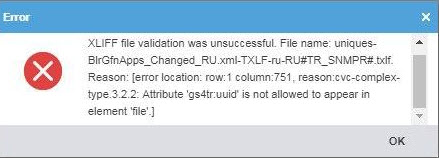
If you use WordFast Pro 5.6 or another version older than Wordfast Pro 5.12 and try opening TXLF files generated in the new version, you may get the following error message:

Attribute ‘gs4tr:uuid’ is not allowed to appear in the element ‘file’ 
Attribute Error in WordFast 5.6 - 2

It takes place because earlier WF versions can’t recognize this attribute. To solve this problem, you can download and install a new 5.12 version. But there is another bypass solution.

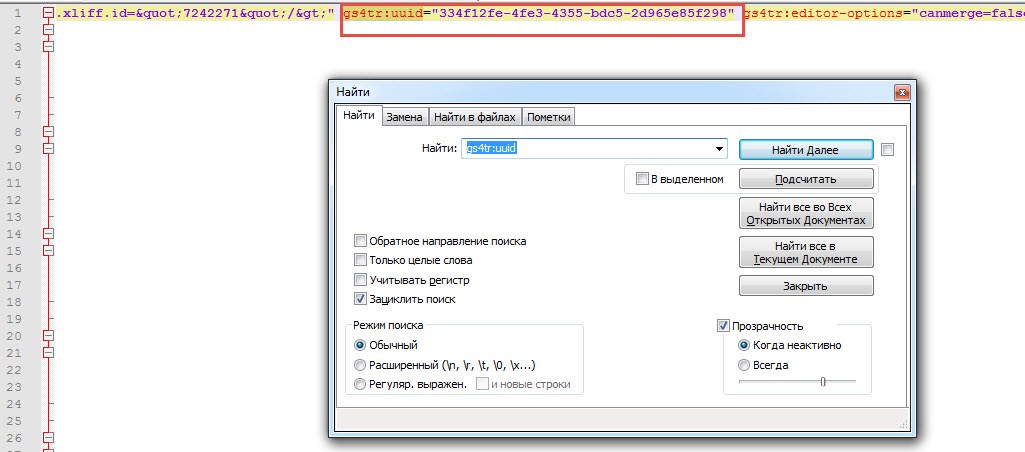
Open the TXLF file in the text editor Notepad++, use the search function (Ctrl + F) to find “gs4tr:uuid,” and delete the attribute together with its number and the redundant space as shown in the screenshot. Click the Save button and close the file tab.
Attribute Error in WordFast 5.6 - 3

After this, the file opens in WordFast 5.6, and no error messages appear.

Recommended content

Attribute Error in WordFast 5.6 - 4

A Few Abbreviations Every Technical Translator Should Know

Useful information for technical translators Here is are a few abbreviations you will encounter regularly if you work in technical translation:   See more interesting posts in our Telegram channel.
Attribute Error in WordFast 5.6 - 5

How to Select Text from the Cursor to a Specific Character in Word

Useful tips about working in Word In addition to the well-known Alt + mouse-click text selection trick, Word offers another lesser-known feature: Selection Extension mode. If you need to select text from the cursor to a specific character—especially if that character is difficult to locate or is currently outside the visible screen area—press F8, then […]
Attribute Error in WordFast 5.6 - 6

How to fix the «Failed to load project from …» error in Trados Studio

Про ще одну помилку Trados Studio Розбираємо помилку Trados Studio: Failed to load project from … There is an error in XML document (X, Y). Unexpected end of file has occurred. Unexpected end of file while parsing Name has occurred. Помилка викликана порушенням структури SDLPROJ-файлу. Таке трапляється, наприклад, через несподіване завершення роботи Trados Studio в […]
Attribute Error in WordFast 5.6 - 7

How to Prevent Data Loss If Your CAT Tool Crashes

Useful tips about working with CATs If your CAT tool crashes and there is a risk of losing the completed portion of your translation, the first priority is to preserve the work you have already done. Only after securing the data should you attempt to fix the issue. Otherwise, you may have to redo the […]
Attribute Error in WordFast 5.6 - 8

Why Word May Refuse to Check Spelling

Useful tips about working in Word Why Word may refuse to check spelling: Go to File → Options → Proofing, then select the Check spelling as you type checkbox and clear the Hide spelling errors in this document only checkbox (see image). Select the text you want to check, then verify that the correct language […]