our blog
How to enter characters that are not on the keyboard
07 August 2026
About ways to enter characters that are not on the keyboard
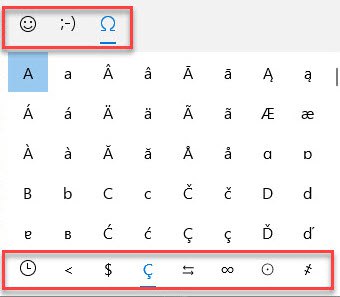
If you’re working on Windows and need to type something that isn’t on the keyboard, press Win + ;.
A small window will appear where you can choose the type of character you want (regular, emoji, or smiley) at the top and specify it at the bottom.
There’s no need to close this window: it will disappear as soon as you switch to any other program.
Recommended content

How Machine Translation Works
A metaphor for the machine translation process Imagine this: you are sitting in a room. It is sparsely furnished, with nothing but a desk, a chair, and an enormous bookcase. The shelves are packed with books, but every book has exactly the same cover, making them impossible to tell apart. You are good at your […]

How to Fix the “Failed to Save Target Content. Cannot Find File Type Definition” Error in Trados Studio
Another Trados Studio error The Failed to save target content error may occur when you try to create a “clean” file—that is, remove the source text from the translated file and leave only the translation using the Clean Up feature. This most commonly happens when a Trados Studio package was created on one computer, but […]

The Easiest Way to Identify the Language of a Text
Tips for identifying a text’s language The easiest way to identify the language of a text is to paste it into Google Translate and click Detect language. If Google Translate is unavailable, you can try identifying the language manually by looking for distinctive letters and symbols: You can find more information here.

How to Fix the “LNG Is Missing” Error in MultiTerm
Troubleshooting a MultiTerm error If the LNG is missing message repeatedly appears when you launch SDL MultiTerm or work with terms—even though the program continues to function normally—there is a 99% chance that Trados Studio and MultiTerm are set to different interface languages on your computer. Set both programs to the same language, and the […]

How to Fix the “The Specified Project Name Is Invalid” Error in Trados Studio
Troubleshooting another Trados Studio error When creating a project in Trados Studio, you may see the following message: The specified project name is invalid. The name should not contain any invalid characters such as: \ / : * ? ” < > | If this happens even though the project name does not appear to […]

