our blog

How to Convert Wordfast TM into TMX

How to Convert Wordfast TM into TMX - 1

The most convenient way to convert Wordfast TM to TMX format involves Xbench

Wordfast TM file has .txt extension. It is a usual .txt file delimited with tabs specially. There are several ways to convert it to TMX format that allows TM exchange between other CAT tools. The easiest and quickest way involves Xbench (either free or paid version).

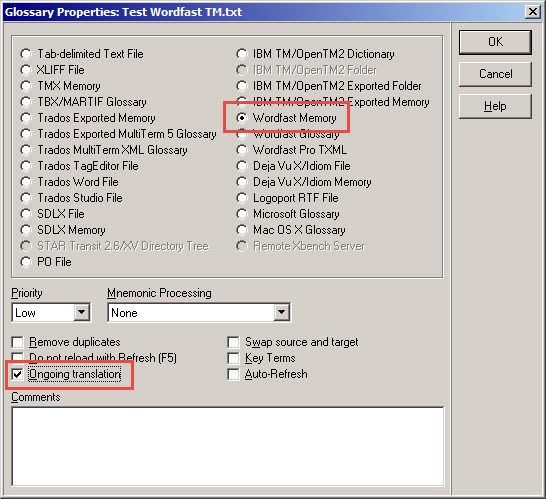
Step 1: Load your Wordfast TM into Xbench. There is a special file type Wordfast Memory:
How to Convert Wordfast TM into TMX - 2

Do not forget to set the checkbox Ongoing translation.

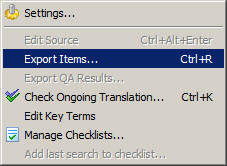
Step 2: In Xbench, select Tools > Export Items, or simply press Ctrl + R.
How to Convert Wordfast TM into TMX - 3

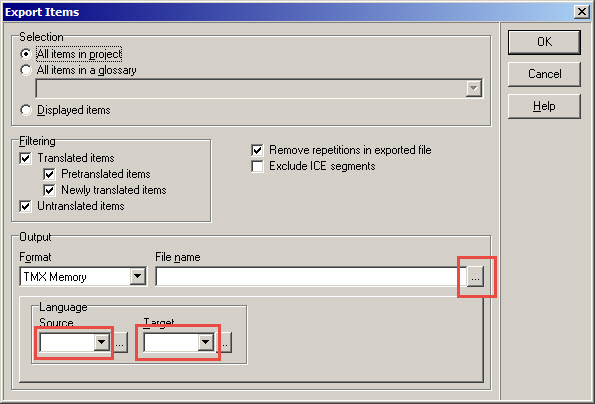
Export Items dialog box appears. Specify the settings in the Output section: select source and target languages, and the path and the file name for the .tmx file of the TM.
How to Convert Wordfast TM into TMX - 4

Press the OK button. The .tmx file you get is the converted Wordfast TM.

Recommended content

How to Convert Wordfast TM into TMX - 5

How to enter characters that are not on the keyboard

About ways to enter characters that are not on the keyboard If you’re working on Windows and need to type something that isn’t on the keyboard, press Win + ;. A small window will appear where you can choose the type of character you want (regular, emoji, or smiley) at the top and specify it […]
How to Convert Wordfast TM into TMX - 6

How to fix the “Value cannot be null. Parameter name culture” error in Trados Studio

About another error in Trados Studio If you create a project in Trados Studio and when asking to see a preview of the file, it says that you are not cultured enough, Value cannot be null. Parameter name: culture —ignore it: the project will be created properly and everything will be fine. It’s only the […]
How to Convert Wordfast TM into TMX - 7

Indirect signs that you are losing money

Reflections based on observations Computer Files Programs Word Text Internet
How to Convert Wordfast TM into TMX - 8

How to type a number in superscript or subscript

About superscript or subscript numbers How do you type a number in the upper or lower index if the text editor has no idea what an index is? For example, in a regular Notepad (and, by the way, in Telegram). This is where Unicode comes in. It has ready-made symbols for numbers in the upper […]
How to Convert Wordfast TM into TMX - 9

How to quickly adjust the text size on a web page in Windows

About adjusting the text size on a web page in Windows The fastest way to adjust the text size of a web page in Windows is to spin the mouse wheel while holding down the Ctrl key: On laptops that use a touchpad instead of a mouse, you can use the following commands: Plus and Minus […]