our blog
How to fix the «Failed to load project from …» error in Trados Studio
14 May 2026
About another error in Trados Studio
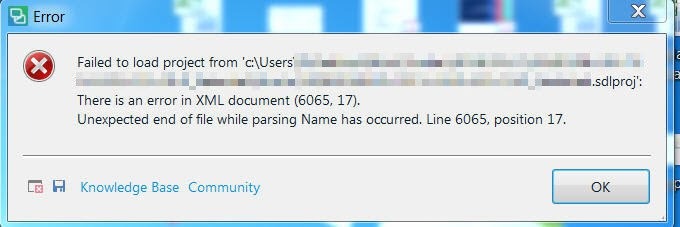
Let's analyze the Trados Studio error:
Failed to load project from ...
There is an error in XML document (X, Y). Unexpected end of file has occurred.
Unexpected end of file while parsing Name has occurred.
The error is caused by a violation of the structure of the SDLPROJ file. This can happen, for example, if Trados Studio terminates unexpectedly while writing data to the file.
The SDLPROJ file stores information about which files are included in the project and where they are located on the disk. If the file becomes corrupted, the project files themselves may still exist, but Trados Studio can no longer determine their locations.
How to fix it:
- Go to the folder containing the SDLPROJ file. Its location is indicated in the error message.
- Delete the corrupted SDLPROJ file.
- Start Trados Studio.
- Recreate the project and reconnect the relevant source translation memory (or translation memories).
- If necessary, retranslate the project files using the restored translation memory.
For more information about this error, see this link.
Recommended content

How to use the ampersand and how is it different from and
A little bit on how & is different from and The ampersand is a ligature that the Latin conjunction et, which means and, has been transformed into. Once upon a time, the ampersand was even considered the 27th letter of the alphabet. When pronouncing letters in the alphabet, it was ended with the words and […]

How to split a large Trados Studio file into multiple parts
About splitting a large file into multiple parts How to split a large Trados Studio file into several parts: ➕ The plugin is free, simple, and effective. Trados Studio is not needed at all. ➖ It is better to use it only for splits, there are problems with merges. * * * ➕ Always works […]

T9N, L10N, I18N, G11N, C13N, M17N, V8N
Some slang abbreviations from the localization field Let’s check some slang abbreviations from the localization field. All of them are based on the principle of “taking the first and last letters of a word, cutting out the middle, and writing the number of the cut out letters instead.” These terms are vague, and their meanings […]
How to enter characters that are not on the keyboard
About ways to enter characters that are not on the keyboard If you’re working on Windows and need to type something that isn’t on the keyboard, press Win + ;. A small window will appear where you can choose the type of character you want (regular, emoji, or smiley) at the top and specify it […]
How to fix the “Value cannot be null. Parameter name culture” error in Trados Studio
About another error in Trados Studio If you create a project in Trados Studio and when asking to see a preview of the file, it says that you are not cultured enough, Value cannot be null. Parameter name: culture —ignore it: the project will be created properly and everything will be fine. It’s only the […]

