How to Fix the “Corrupt File: Missing Locked Content for …” Error in Trados Studio

Another Trados Studio error
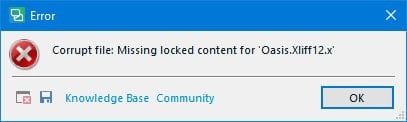
Let’s take a look at an error message that may appear when you try to open a document in Trados Studio:
Corrupt file: Missing locked content for "..."
Trados Studio itself is most likely not to blame. The error usually occurs because the file was processed in another CAT tool that did not handle it correctly.
In our case, the project manager assigned the job to a translator in Trados Studio. Without telling the manager, the translator imported the project into Smartcat and completed the translation there. Smartcat generated the translated file, but Trados Studio failed to recognize it when it was imported back.
The easiest solution is to ask the person who provided the corrupted file to generate a valid file in Trados Studio.
If that is not possible, import as much of the translation as you can into a temporary translation memory. Then go through the documents manually, inserting translations from the matching segments in the translation memory by pressing Ctrl + T and checking each segment as you go.
Recommended content

How Machine Translation Works

How to Fix the “Failed to Save Target Content. Cannot Find File Type Definition” Error in Trados Studio

The Easiest Way to Identify the Language of a Text

How to Fix the “LNG Is Missing” Error in MultiTerm