our blog

The Mystery of the “Object Reference Not Set to an Instance of an Object” Error in Trados Studio

The Mystery of the “Object Reference Not Set to an Instance of an Object” Error in Trados Studio - 1

“Object reference not set to an instance of an object” is a puzzling and rather unpleasant error in Trados Studio

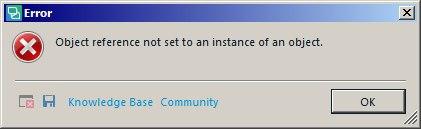
Object reference not set to an instance of an object is one of the most unpleasant error messages in Trados Studio. It seems to be coming not from Trados Studio itself, but somewhere from .NET. It may appear in other programs, too.
The Mystery of the “Object Reference Not Set to an Instance of an Object” Error in Trados Studio - 2

Likewise, it has a hundred possible reasons, and that is what makes it so unpleasant. We’ve just discovered one of those: the message appears when you try to open in Trados Studio an SDLXLIFF file containing segments with a pillow.

Pilcrows are not supposed to be inside segments in the first place, only between them—we should give credit to Studio for that. When it is necessary to split a line right inside the segment, one usually inserts a line break with the help of Shift + Enter. However, as practice shows, anything may happen during the import of files created in other programs into Studio.

In this particular case, no countermeasures can remove the error because the pilcrows can’t be removed. Theoretically, editing the source text might help, but it is the last refuge of the enthusiast as it may cause problems during further manipulations with the files. By default, the source text is not to be touched.

And how to get rid of this error under “normal” circumstances we’ll tell you later. There is one universal method...


Recommended content

The Mystery of the “Object Reference Not Set to an Instance of an Object” Error in Trados Studio - 3

How to fix the «Failed to load project from …» error in Trados Studio

About another error in Trados Studio Let’s analyze the Trados Studio error: Failed to load project from … There is an error in XML document (X, Y). Unexpected end of file has occurred. Unexpected end of file while parsing Name has occurred. The error is caused by a violation of the structure of the SDLPROJ […]
The Mystery of the “Object Reference Not Set to an Instance of an Object” Error in Trados Studio - 4

A Few Abbreviations Every Technical Translator Should Know

Useful information for technical translators Here is are a few abbreviations you will encounter regularly if you work in technical translation:  
The Mystery of the “Object Reference Not Set to an Instance of an Object” Error in Trados Studio - 5

How to Prevent Data Loss If Your CAT Tool Crashes

Useful tips about working with CATs If your CAT tool crashes and there is a risk of losing the completed portion of your translation, the first priority is to preserve the work you have already done. Only after securing the data should you attempt to fix the issue. Otherwise, you may have to redo the […]
The Mystery of the “Object Reference Not Set to an Instance of an Object” Error in Trados Studio - 6

Why Word May Refuse to Check Spelling

Useful tips about working in Word Why Word may refuse to check spelling: Go to File → Options → Proofing, then select the Check spelling as you type checkbox and clear the Hide spelling errors in this document only checkbox (see image). Select the text you want to check, then verify that the correct language […]
The Mystery of the “Object Reference Not Set to an Instance of an Object” Error in Trados Studio - 7

How to replace “straight quotes” with «guillemets» in Word

Useful tips about working in Word We already know how to quickly replace straight quotes with guillemets in Trados Studio and memoQ. Sometimes this has to be done not in the CAT tool but directly in the “monotext,” the text in the target language in Word. The easiest way to do this is to use […]