our blog

How to Remove the “The Translation Memory … Could Not Be Opened” Error in Trados Studio

How to Remove the “The Translation Memory … Could Not Be Opened” Error in Trados Studio - 1

What danger lies in clouds

When several translators are working on a big project simultaneously, it seems very alluring to put the translation memory in some cloud, connect all the vendors to it, and the translations of one of them will be immediately available to all the others as if working with a server or in an online CAT tool.

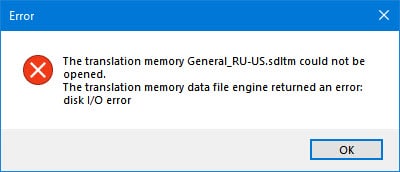
In theory. In practice, however, what you get is this:
How to Remove the “The Translation Memory … Could Not Be Opened” Error in Trados Studio - 2

The translation memory ... could not be opened. The translation memory data file engine returned an error: disk I/O error.

This is an error due to a simultaneous access attempt. In this case, Trados Studio got into a fight with Google Disc: they failed to agree on who will be the first to access the SDLTM file. The same could have happened in Dropbox, OneDrive, etc.

Trados Studio is not to blame here: this error can appear in any offline CAT tool, even when there is only one translator.

Conclusion: if you want to work with one translation memory simultaneously, use either a server version of the CAT tool or an online CAT tool.


Recommended content

How to Remove the “The Translation Memory … Could Not Be Opened” Error in Trados Studio - 3

How to fix the «Failed to load project from …» error in Trados Studio

About another error in Trados Studio Let’s analyze the Trados Studio error: Failed to load project from … There is an error in XML document (X, Y). Unexpected end of file has occurred. Unexpected end of file while parsing Name has occurred. The error is caused by a violation of the structure of the SDLPROJ […]
How to Remove the “The Translation Memory … Could Not Be Opened” Error in Trados Studio - 4

A Few Abbreviations Every Technical Translator Should Know

Useful information for technical translators Here is are a few abbreviations you will encounter regularly if you work in technical translation:  
How to Remove the “The Translation Memory … Could Not Be Opened” Error in Trados Studio - 5

How to Prevent Data Loss If Your CAT Tool Crashes

Useful tips about working with CATs If your CAT tool crashes and there is a risk of losing the completed portion of your translation, the first priority is to preserve the work you have already done. Only after securing the data should you attempt to fix the issue. Otherwise, you may have to redo the […]
How to Remove the “The Translation Memory … Could Not Be Opened” Error in Trados Studio - 6

Why Word May Refuse to Check Spelling

Useful tips about working in Word Why Word may refuse to check spelling: Go to File → Options → Proofing, then select the Check spelling as you type checkbox and clear the Hide spelling errors in this document only checkbox (see image). Select the text you want to check, then verify that the correct language […]
How to Remove the “The Translation Memory … Could Not Be Opened” Error in Trados Studio - 7

How to replace “straight quotes” with «guillemets» in Word

Useful tips about working in Word We already know how to quickly replace straight quotes with guillemets in Trados Studio and memoQ. Sometimes this has to be done not in the CAT tool but directly in the “monotext,” the text in the target language in Word. The easiest way to do this is to use […]