our blog

How to Remove the “The Translation Memory … Could Not Be Opened” Error in Trados Studio

How to Remove the “The Translation Memory … Could Not Be Opened” Error in Trados Studio - 1

What danger lies in clouds

When several translators are working on a big project simultaneously, it seems very alluring to put the translation memory in some cloud, connect all the vendors to it, and the translations of one of them will be immediately available to all the others as if working with a server or in an online CAT tool.

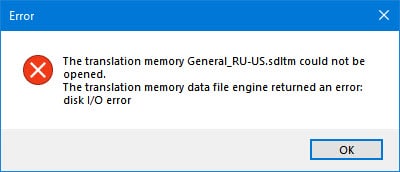
In theory. In practice, however, what you get is this:
How to Remove the “The Translation Memory … Could Not Be Opened” Error in Trados Studio - 2

The translation memory ... could not be opened. The translation memory data file engine returned an error: disk I/O error.

This is an error due to a simultaneous access attempt. In this case, Trados Studio got into a fight with Google Disc: they failed to agree on who will be the first to access the SDLTM file. The same could have happened in Dropbox, OneDrive, etc.

Trados Studio is not to blame here: this error can appear in any offline CAT tool, even when there is only one translator.

Conclusion: if you want to work with one translation memory simultaneously, use either a server version of the CAT tool or an online CAT tool.


Recommended content

How to Remove the “The Translation Memory … Could Not Be Opened” Error in Trados Studio - 3

Where will experienced translators come from if there are fewer inexperienced ones on the market?

Abstract semi-philosophical considerations Machine translation is gradually pushing out of the market those translators who cannot keep up with it in terms of quality, i.e., those who are not very experienced. As a result, the ratio of experienced to inexperienced translators should theoretically gradually change in favor of the former. This seems to be a […]
How to Remove the “The Translation Memory … Could Not Be Opened” Error in Trados Studio - 4

How to fix «Failed to save target content: Cannot find central directory» error in Trados Studio

About the ways to fix the issue in Trados Studio When trying to generate a translated document in Trados Studio, this error sometimes occurs: Failed to save target content: Cannot find central directory. It happens because of corrupted data in the source file used to create and store the SDLXLIFF file you translated in Trados […]
How to Remove the “The Translation Memory … Could Not Be Opened” Error in Trados Studio - 5

How to fix «Failed to open return package» error in Trados Studio

About another issue in Trados Studio When importing a package, Trados Studio might say that it Failed to open return package, because it contains a project that does not exist in your setup. That it’s not a Trados Studio issue, but yours: you tried to import a return package for a project Trados Studio doesn’t […]
How to Remove the “The Translation Memory … Could Not Be Opened” Error in Trados Studio - 6

Lorem ipsum

About the dummy or placeholder text Lorem ipsum is a meaningless Latin text, so-called dummy or placeholder text, which is used to estimate how a layout will look with text presented in a particular font. This is usually done by designers, but it is also needed for pseudo-localization. This text became widely popular due to […]
How to Remove the “The Translation Memory … Could Not Be Opened” Error in Trados Studio - 7

You sell not only the translation, but also your expertise

Some thoughts and reflections Modern technical translators have to be inquisitive. They don’t even have to; they must. The tools they use today will become unrecognizable in a few years. New programs and methods emerge, existing knowledge becomes outdated, and translators who are not interested in anything beyond the text are being outpaced by more […]