our blog

How to Move a Trados Studio Project from One Folder on Your Computer to Another

How to Move a Trados Studio Project from One Folder on Your Computer to Another - 1

Notes on moving a Trados Studio project from one folder on your computer to another
How to Move a Trados Studio Project from One Folder on Your Computer to Another - 2

By default, Trados Studio saves all projects in the depths of Windows, in the following folder:

C:\Users\<User>\Documents\Studio <version>\Projects

But sometimes, it makes sense to move one or more projects to another folder: for example, to free up your nearly full C drive or to shorten the path to files (Trados Studio despises long paths).

* * *

Here’s the most reliable way to move a Trados Studio project from one folder on your computer to another:

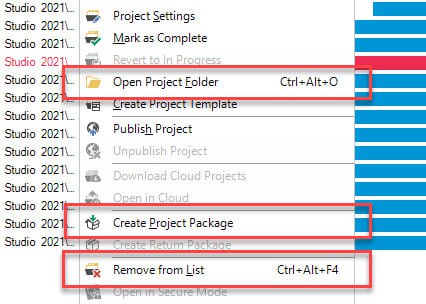
1. Pack the project to the source package:

  • Select the project;
  • Right-click it;
  • Create Project Package.

2. Find the project files on the disk (but do not delete it yet):

  • Select the project;
  • Right-click it;
  • Open Project Folder;
  • Explorer with the project files appears.

3. Delete the project from Trados Studio:

  • Select the project;
  • Right-click it;
  • Remove from List.

4. Delete it from the disk in the Explorer that appeared in Step 2.

5. Import the source package created in Step 1 and specify the new folder when importing.


Recommended content

How to Move a Trados Studio Project from One Folder on Your Computer to Another - 3

How to fix «Failed to save target content: Cannot find central directory» error in Trados Studio

About the ways to fix the issue in Trados Studio When trying to generate a translated document in Trados Studio, this error sometimes occurs: Failed to save target content: Cannot find central directory. It happens because of corrupted data in the source file used to create and store the SDLXLIFF file you translated in Trados […]
How to Move a Trados Studio Project from One Folder on Your Computer to Another - 4

How to fix «Failed to open return package» error in Trados Studio

About another issue in Trados Studio When importing a package, Trados Studio might say that it Failed to open return package, because it contains a project that does not exist in your setup. That it’s not a Trados Studio issue, but yours: you tried to import a return package for a project Trados Studio doesn’t […]
How to Move a Trados Studio Project from One Folder on Your Computer to Another - 5

Lorem ipsum

About the dummy or placeholder text Lorem ipsum is a meaningless Latin text, so-called dummy or placeholder text, which is used to estimate how a layout will look with text presented in a particular font. This is usually done by designers, but it is also needed for pseudo-localization. This text became widely popular due to […]
How to Move a Trados Studio Project from One Folder on Your Computer to Another - 6

You sell not only the translation, but also your expertise

Some thoughts and reflections Modern technical translators have to be inquisitive. They don’t even have to; they must. The tools they use today will become unrecognizable in a few years. New programs and methods emerge, existing knowledge becomes outdated, and translators who are not interested in anything beyond the text are being outpaced by more […]
How to Move a Trados Studio Project from One Folder on Your Computer to Another - 7

Two stories about ChatGPT

Interesting facts about AI In early April 2024, artificial intelligence expert Jeremy Nguyen shared a thing he noticed: for some reason, the unremarkable word delve was used unexpectedly often in the texts generated by ChatGPT. So much often that Paul Graham, co-founder of Y Combinator and noted IT evangelist, considers the presence of this word […]