our blog

How to Get Rid of the “Could Not Load File or Assembly or One of Its Dependencies” Error in Trados Studio
How to Get Rid of the “Could Not Load File or Assembly or One of Its Dependencies” Error in Trados Studio - 1

A post for translators working with WorldServer WSXZ packages

As it is already known, starting from version 2021, Trados Studio has forgotten how to work with WSXZ packages out of the box. To work with them, you need to install a special plug-in beforehand: WorldServer Compatibility Pack for SDL Trados Studio. To download the plug-in, an RWS account is required.

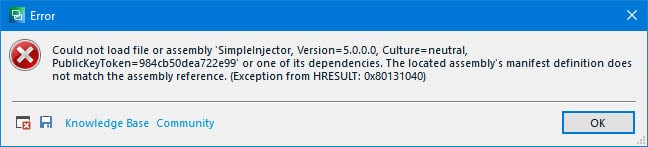
In practice, we have encountered the following: if the plug-in is too fresh and its version exceeds the Trados Studio version, an error message after the start appears, and, as it usually happens in Trados Studio, it is quite uninformative:
How to Get Rid of the “Could Not Load File or Assembly or One of Its Dependencies” Error in Trados Studio - 2

Could not load file or assembly <...> or one of its dependencies. The located assembly’s manifest definition does not match the assembly reference. <...>

This error is easy to remove: close Trados Studio (you won’t be able to start it anyway), delete all the versions of the plug-in, install its correct version, and restart your computer. Everything should work fine after this.


See more interesting posts in our Telegram channel.

Recommended content

How to Get Rid of the “Could Not Load File or Assembly or One of Its Dependencies” Error in Trados Studio - 3

How to Prevent Data Loss If Your CAT Tool Crashes

Useful tips about working with CATs If your CAT tool crashes and there is a risk of losing the completed portion of your translation, the first priority is to preserve the work you have already done. Only after securing the data should you attempt to fix the issue. Otherwise, you may have to redo the […]
How to Get Rid of the “Could Not Load File or Assembly or One of Its Dependencies” Error in Trados Studio - 4

Why Word May Refuse to Check Spelling

Useful tips about working in Word Why Word may refuse to check spelling: Go to File → Options → Proofing, then select the Check spelling as you type checkbox and clear the Hide spelling errors in this document only checkbox (see image). Select the text you want to check, then verify that the correct language […]
How to Get Rid of the “Could Not Load File or Assembly or One of Its Dependencies” Error in Trados Studio - 5

How the Ctrl + G Key Combination Works in Different Programs

The Ctrl + G shortcut is one of the most underrated navigation tools across modern applications. Whether you work in a browser, Word, Excel, or a CAT tool, this key combination lets you jump to a specific location instantly—a line, page, cell, segment, or the next match. Because many users rely only on Ctrl + […]
How to Get Rid of the “Could Not Load File or Assembly or One of Its Dependencies” Error in Trados Studio - 6

How to Get Rid of Annoying Pop-Ups in Word

Microsoft Word is one of the most popular tools for writing, editing, and formatting documents. However, many users eventually face the same frustration: constant Word pop-ups that interrupt workflow when opening or closing files. These notifications may include error messages, template warnings, or add-in alerts. The good news is that in most cases, you can […]
How to Get Rid of the “Could Not Load File or Assembly or One of Its Dependencies” Error in Trados Studio - 7

How to Configure the Enter Key Behavior in Passolo

Passolo software (also known as SDL Passolo) is one of the most user-friendly tools for software localization. However, even experienced Passolo translators may not realize that the Enter key behavior in this program can be customized. Adjusting this setting helps you prevent unwanted automatic confirmation of segments, maintain flexibility during translation, and improve your overall […]