our blog

How to Get Rid of the “We Found Problems with Some of the Filenames in This Package and We Will Attempt to Fix Them” Error in Trados Studio

How to Get Rid of the “We Found Problems with Some of the Filenames in This Package and We Will Attempt to Fix Them” Error in Trados Studio - 1

A Trados Studio error that occurs in a regular situation

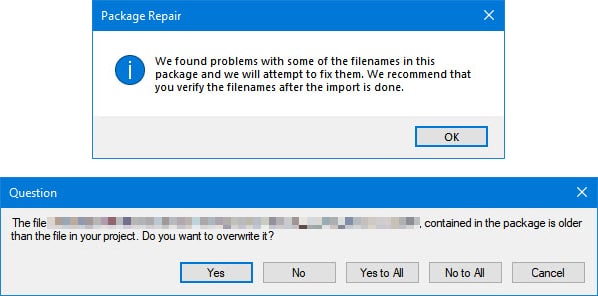
This Trados Studio error occurs when you try importing a return package from the translator:
How to Get Rid of the “We Found Problems with Some of the Filenames in This Package and We Will Attempt to Fix Them” Error in Trados Studio - 2

We found problems with some of the filenames in this package and we will attempt to fix them. We recommend that you verify the filenames after the import is done.

And after pressing OK another message appears:

The file <...> contained in the package is older than the file in your project. Do you want to replace it?

The error occurs when the translator has worked in a super new version of Trados Studio (more precisely, the editor has worked in a super old one). In our case, the translator worked in version 2021, and the editor used version 2017.

It is easily cured: you should either update Trados Studio or add the translated segments into a translation memory and pre-translate the project with them.


Recommended content

How to Get Rid of the “We Found Problems with Some of the Filenames in This Package and We Will Attempt to Fix Them” Error in Trados Studio - 3

How to use the ampersand and how is it different from and

A little bit on how & is different from and The ampersand is a ligature that the Latin conjunction et, which means and, has been transformed into. Once upon a time, the ampersand was even considered the 27th letter of the alphabet. When pronouncing letters in the alphabet, it was ended with the words and […]
How to Get Rid of the “We Found Problems with Some of the Filenames in This Package and We Will Attempt to Fix Them” Error in Trados Studio - 4

How to split a large Trados Studio file into multiple parts

About splitting a large file into multiple parts How to split a large Trados Studio file into several parts: ➕ The plugin is free, simple, and effective. Trados Studio is not needed at all. ➖ It is better to use it only for splits, there are problems with merges. * * * ➕ Always works […]
How to Get Rid of the “We Found Problems with Some of the Filenames in This Package and We Will Attempt to Fix Them” Error in Trados Studio - 5

T9N, L10N, I18N, G11N, C13N, M17N, V8N

Some slang abbreviations from the localization field Let’s check some slang abbreviations from the localization field. All of them are based on the principle of “taking the first and last letters of a word, cutting out the middle, and writing the number of the cut out letters instead.” These terms are vague, and their meanings […]
How to Get Rid of the “We Found Problems with Some of the Filenames in This Package and We Will Attempt to Fix Them” Error in Trados Studio - 6

How to enter characters that are not on the keyboard

About ways to enter characters that are not on the keyboard If you’re working on Windows and need to type something that isn’t on the keyboard, press Win + ;. A small window will appear where you can choose the type of character you want (regular, emoji, or smiley) at the top and specify it […]
How to Get Rid of the “We Found Problems with Some of the Filenames in This Package and We Will Attempt to Fix Them” Error in Trados Studio - 7

How to fix the “Value cannot be null. Parameter name culture” error in Trados Studio

About another error in Trados Studio If you create a project in Trados Studio and when asking to see a preview of the file, it says that you are not cultured enough, Value cannot be null. Parameter name: culture —ignore it: the project will be created properly and everything will be fine. It’s only the […]