our blog

How to Enable and Configure Spelling Check in Word

How to Enable and Configure Spelling Check in Word - 1

Word is the most important program for spell-checking

According to modern quality standards, spelling mistakes are a relic of the past: they are not acceptable at all. If some word is underlined with red, it is an obvious reason to check it.

This may seem strange, but in many programs, both “regular” ones and CAT tools, by default spelling check is either not correctly configured or not enabled at all. In some of them, you have to enable spelling check manually, while in others, you need to add glossaries first, set some checkboxes, add some extensions or plugins, etc.

In this post (and several upcoming posts), we will show how to make necessary adjustments in different programs to automatize spelling checks.

The very first program, we are configuring, is Word itself. We begin with Word because many other programs use (or allow using) its spelling engine.

To enable spelling check, please select:

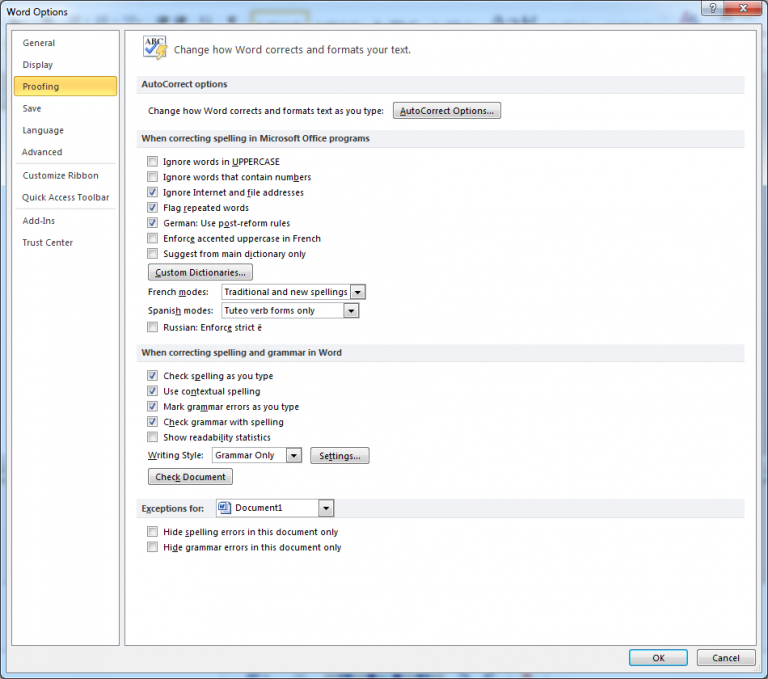
File > Options > Word Options > Proofing
How to Enable and Configure Spelling Check in Word - 2

Here, please select the checkboxes Check spelling as you type Use contextual spelling and deselect the checkbox Hide spelling errors in this document only.

Please note the following:

  • To be able to perform spelling checks in some languages, the corresponding language files must be installed along with Microsoft Office or added later.
  • Word automatically disables spelling check, if it spots over 2000 issues. If this happens, you have to enable it manually.
  • Word can perform spelling checks on different languages simultaneously. To do this, parts of the text in different languages must have correct language attributes. In other words, you should show Word, where English, Japanese, Czech, and other languages are.

Recommended content

How to Enable and Configure Spelling Check in Word - 3

How to Fix the “Corrupt File: Missing Locked Content for …” Error in Trados Studio

Another Trados Studio error Let’s take a look at an error message that may appear when you try to open a document in Trados Studio: Corrupt file: Missing locked content for “…” Trados Studio itself is most likely not to blame. The error usually occurs because the file was processed in another CAT tool that […]
How to Enable and Configure Spelling Check in Word - 4

How Machine Translation Works

A metaphor for the machine translation process Imagine this: you are sitting in a room. It is sparsely furnished, with nothing but a desk, a chair, and an enormous bookcase. The shelves are packed with books, but every book has exactly the same cover, making them impossible to tell apart. You are good at your […]
How to Enable and Configure Spelling Check in Word - 5

How to Fix the “Failed to Save Target Content. Cannot Find File Type Definition” Error in Trados Studio

Another Trados Studio error The Failed to save target content error may occur when you try to create a “clean” file—that is, remove the source text from the translated file and leave only the translation using the Clean Up feature. This most commonly happens when a Trados Studio package was created on one computer, but […]
How to Enable and Configure Spelling Check in Word - 6

The Easiest Way to Identify the Language of a Text

Tips for identifying a text’s language The easiest way to identify the language of a text is to paste it into Google Translate and click Detect language. If Google Translate is unavailable, you can try identifying the language manually by looking for distinctive letters and symbols: You can find more information here.
How to Enable and Configure Spelling Check in Word - 7

How to Fix the “LNG Is Missing” Error in MultiTerm

Troubleshooting a MultiTerm error If the LNG is missing message repeatedly appears when you launch SDL MultiTerm or work with terms—even though the program continues to function normally—there is a 99% chance that Trados Studio and MultiTerm are set to different interface languages on your computer. Set both programs to the same language, and the […]