our blog

Hidden Characters in Different CAT Tools

Hidden Characters in Different CAT Tools - 1

In this post, we will show how to enable hidden characters in the mainstream CAT tools

A month ago, we mentioned hidden characters in Word. Since it is useful to see them when working on texts, it makes sense to know how to toggle them in the mainstream CAT tools. 

Trados Studio

When in Editor mode, select Home tab on the ribbon and press this button:

Hidden Characters in Different CAT Tools - 2

There is no special shortcut for enabling/disabling hidden characters, but you can set it yourself in the Trados Studio settings. 

memoQ

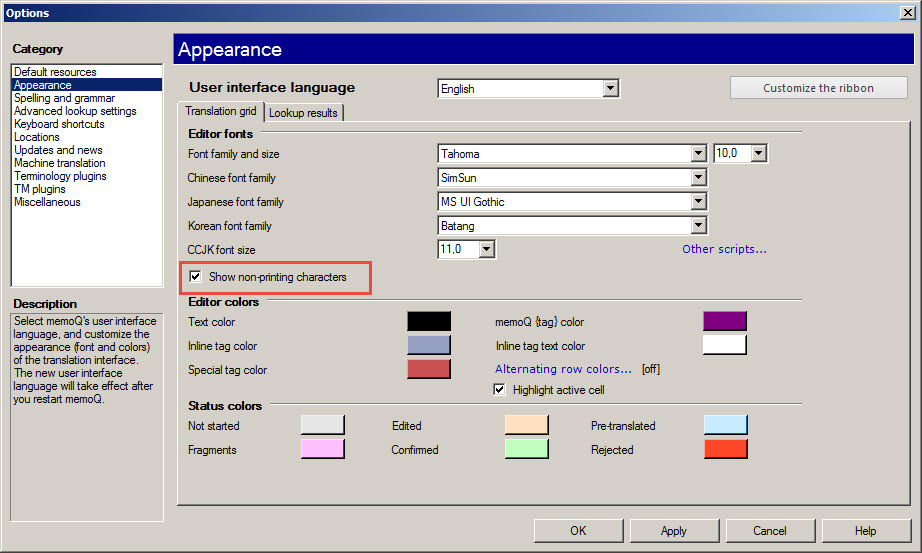
In memoQ, showing hidden characters is somewhat trickier:

Select memoQ (on the ribbon) > Options > OptionsOptions dialog box appears. On the left pane, select Appearance. Then, select Show non-printing characters on the right:
Hidden Characters in Different CAT Tools - 3

Xliff Editor

In Xliff Editor, there is a toggle similar to the one in Word and Trados Studio:

Hidden Characters in Different CAT Tools - 4

TagEditor

The same in TagEditor (from Trados 2007 bundle):

Hidden Characters in Different CAT Tools - 5

Transit NXT

In Transit NXT, select the View tab on the ribbon, then set the checkbox Special characters:

Hidden Characters in Different CAT Tools - 6

Wordfast Pro

The toggle enabling hidden characters in Wordfast is similar to the one in TagEditorWord, and Xliff Editor:

Hidden Characters in Different CAT Tools - 7

Memsource

The same button is used in the Memsource Editor:

Hidden Characters in Different CAT Tools - 8

Recommended content

Hidden Characters in Different CAT Tools - 9

How to fix «Failed to save target content: Cannot find central directory» error in Trados Studio

About the ways to fix the issue in Trados Studio When trying to generate a translated document in Trados Studio, this error sometimes occurs: Failed to save target content: Cannot find central directory. It happens because of corrupted data in the source file used to create and store the SDLXLIFF file you translated in Trados […]
Hidden Characters in Different CAT Tools - 10

How to fix «Failed to open return package» error in Trados Studio

About another issue in Trados Studio When importing a package, Trados Studio might say that it Failed to open return package, because it contains a project that does not exist in your setup. That it’s not a Trados Studio issue, but yours: you tried to import a return package for a project Trados Studio doesn’t […]
Hidden Characters in Different CAT Tools - 11

Lorem ipsum

About the dummy or placeholder text Lorem ipsum is a meaningless Latin text, so-called dummy or placeholder text, which is used to estimate how a layout will look with text presented in a particular font. This is usually done by designers, but it is also needed for pseudo-localization. This text became widely popular due to […]
Hidden Characters in Different CAT Tools - 12

You sell not only the translation, but also your expertise

Some thoughts and reflections Modern technical translators have to be inquisitive. They don’t even have to; they must. The tools they use today will become unrecognizable in a few years. New programs and methods emerge, existing knowledge becomes outdated, and translators who are not interested in anything beyond the text are being outpaced by more […]
Hidden Characters in Different CAT Tools - 13

Two stories about ChatGPT

Interesting facts about AI In early April 2024, artificial intelligence expert Jeremy Nguyen shared a thing he noticed: for some reason, the unremarkable word delve was used unexpectedly often in the texts generated by ChatGPT. So much often that Paul Graham, co-founder of Y Combinator and noted IT evangelist, considers the presence of this word […]