our blog

How to Create a Clean Trados Word File Without Trados

How to Create a Clean Trados Word File Without Trados - 1

You can easily remove the source text from Trados Word files, even without Trados

When your translation performed in Word with Trados (to be exact, Translator's Workbench) is finished, you create a translated file that contains the translation. I.e., you eliminate the source text and leave the translated text (target) only. This operation is called “cleaning”, as you “clean” your file from the source, leaving the target only.

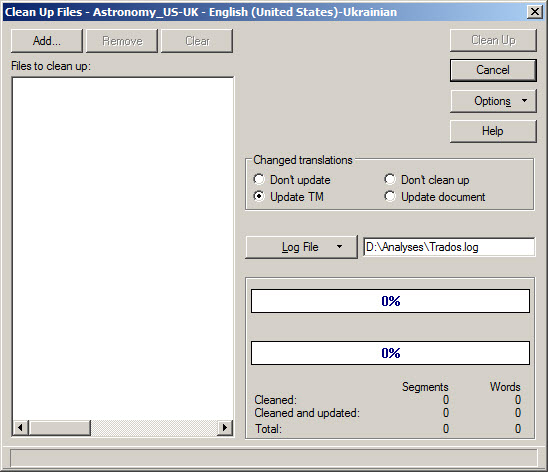
Usually, you do it using the Translator's Workbench: you select Tools > Clean Up, then you choose the Word files and press Clean Up. Translator's Workbench deletes the source text so you get the translated files.
How to Create a Clean Trados Word File Without Trados - 2

But sometimes something goes wrong and the Translator's Workbench fails to clean the files. This usually happens if there are problems with segmentation in the file you are cleaning. Or, you try to clean the files of Word 2007 and higher (.docx files). Or, you need to clean the file from the source on a PC where Trados is not installed at all. Then, the following trick helps.

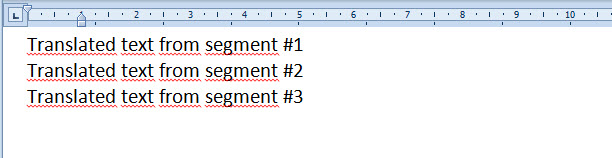
1. Usually, you see only visible text in Word, like this:
How to Create a Clean Trados Word File Without Trados - 3

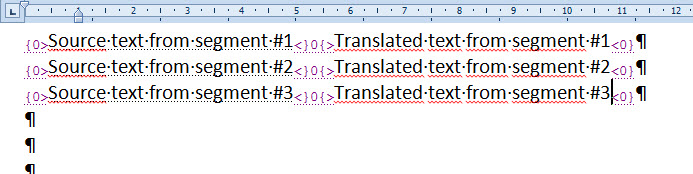
You see the translated text only, while the source text is present in the file as well, but it is hidden. To see the source text, you need to make hidden Word text visible: press How to Create a Clean Trados Word File Without Trados - 4 button on the Word ribbon or press Ctrl + Shift + 8 (just 8, not F8). You will see something like this:
How to Create a Clean Trados Word File Without Trados - 5

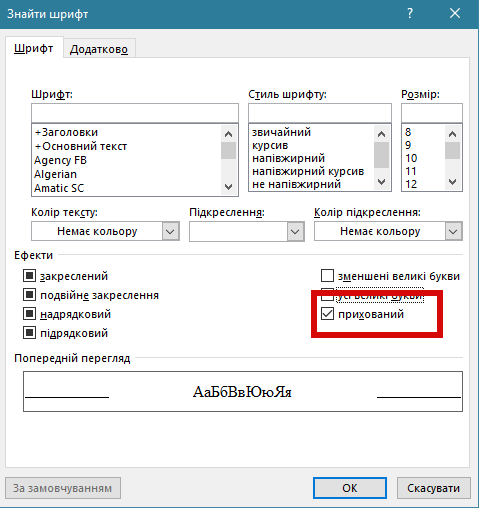
2. To get rid of the source text is in fact to get rid of the hidden text. This can be done right in Word, without Trados. To do this, press Ctrl + H to open the Search and Replace dialog window, then press More, then press Format button > Font > Hidden:
How to Create a Clean Trados Word File Without Trados - 6

Then, press OK and Replace All.

This command deletes all hidden text from a Word file, leaving only the visible one — i.e., only your translation.

Recommended content

How to Create a Clean Trados Word File Without Trados - 7

Where will experienced translators come from if there are fewer inexperienced ones on the market?

Abstract semi-philosophical considerations Machine translation is gradually pushing out of the market those translators who cannot keep up with it in terms of quality, i.e., those who are not very experienced. As a result, the ratio of experienced to inexperienced translators should theoretically gradually change in favor of the former. This seems to be a […]
How to Create a Clean Trados Word File Without Trados - 8

How to fix «Failed to save target content: Cannot find central directory» error in Trados Studio

About the ways to fix the issue in Trados Studio When trying to generate a translated document in Trados Studio, this error sometimes occurs: Failed to save target content: Cannot find central directory. It happens because of corrupted data in the source file used to create and store the SDLXLIFF file you translated in Trados […]
How to Create a Clean Trados Word File Without Trados - 9

How to fix «Failed to open return package» error in Trados Studio

About another issue in Trados Studio When importing a package, Trados Studio might say that it Failed to open return package, because it contains a project that does not exist in your setup. That it’s not a Trados Studio issue, but yours: you tried to import a return package for a project Trados Studio doesn’t […]
How to Create a Clean Trados Word File Without Trados - 10

Lorem ipsum

About the dummy or placeholder text Lorem ipsum is a meaningless Latin text, so-called dummy or placeholder text, which is used to estimate how a layout will look with text presented in a particular font. This is usually done by designers, but it is also needed for pseudo-localization. This text became widely popular due to […]
How to Create a Clean Trados Word File Without Trados - 11

You sell not only the translation, but also your expertise

Some thoughts and reflections Modern technical translators have to be inquisitive. They don’t even have to; they must. The tools they use today will become unrecognizable in a few years. New programs and methods emerge, existing knowledge becomes outdated, and translators who are not interested in anything beyond the text are being outpaced by more […]